Flash Weather AI: Future Radar
- 3.8
- Rating
- 10.00K
- Installs
- Free
- Price
 Analysis by App-foxy
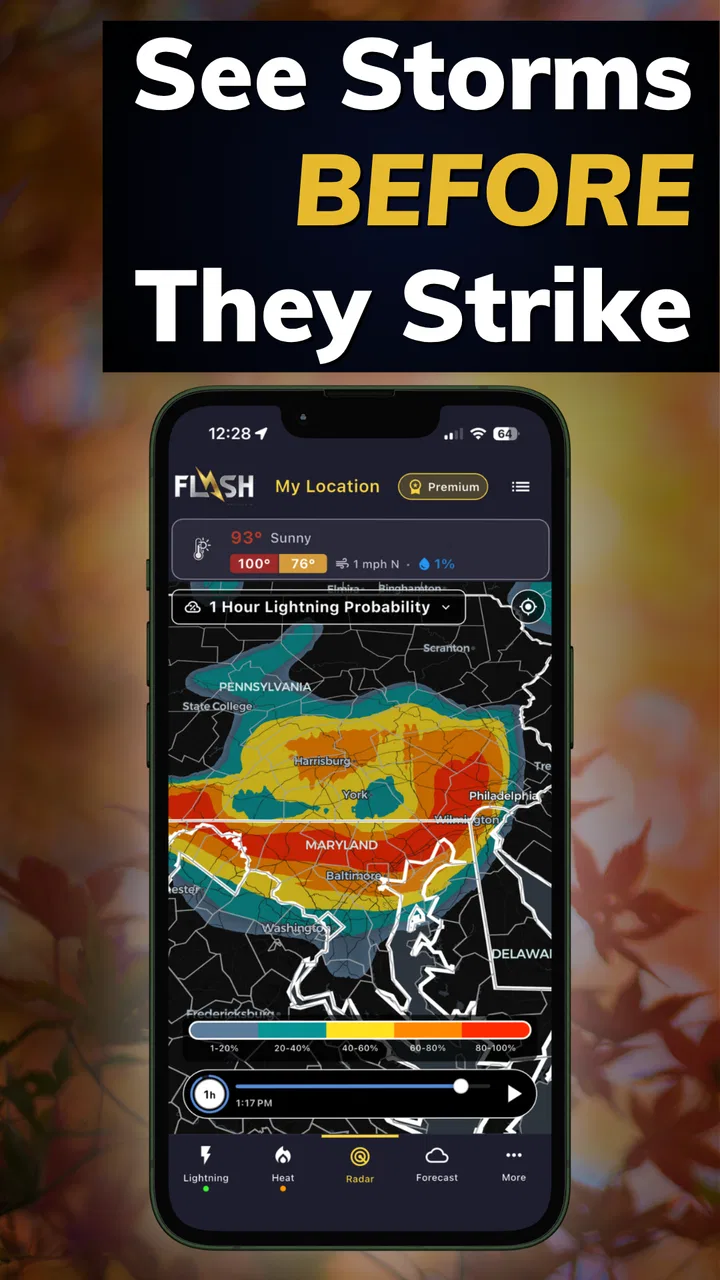
Weather apps usually earn their place on a phone by becoming invisible: I open one, check the forecast, and move on. Flash Weather AI: Future Radar takes a different route. Its appeal is not just showing the current temperature or a familiar forecast panel, but focusing attention on lightning prediction and storm tracking. That makes it immediately interesting when the sky is changing and I want a quicker sense of whether a walk, drive, outdoor job, or family plan is worth continuing.
After spending time with it, my view is that this is a focused weather tool rather than a complete replacement for every forecast service. It can become genuinely useful for people who regularly deal with thunderstorms, but its long-term value depends on whether storm awareness is part of your normal routine. If you only check weather for tomorrow’s temperature, the novelty may fade quickly. If you need to watch unstable conditions as they develop, the central idea has much more staying power.
Why the first week feels different
The first thing I noticed is how clearly the app has chosen its subject. Many weather applications try to cover everything at once: hourly temperatures, extended forecasts, radar layers, air quality, pollen, wind, sunrise times, and severe-weather notices. This one is built around a narrower question: should I pay closer attention to lightning and storms right now?
You May Also Like

 Pandora - Music & Podcasts
Pandora’s Music Is Easy to Start, but Harder to Recover
Pandora’s strength is its low-effort path from a seed to a station. Its weak spot is how much confidence it asks you to place in connection, setup, and quiet recovery.

 AccuWeather: Weather Radar
AccuWeather Review: A Quick, Clear Forecast for Everyday Decisions
For everyday plans, the best forecast is the one you can understand quickly. AccuWeather makes rain timing, radar, and local conditions easy to act on, with a few trade-offs.

 Hill Climb Racing
Why Hill Climb Racing Still Turns Crashes Into One More Run
A tiny car, a bumpy hill and one more upgrade: Hill Climb Racing keeps resurfacing because its simple chaos makes every near-miss feel personal.

 AliExpress - Shopping App
AliExpress Makes Global Shopping Feel Personal, but Shoppers Bear the Risk
AliExpress turns a global marketplace into a pocket-sized discovery engine. Its reach is useful, its shopping loop compelling, and its trade-offs easy to miss.

 Lords Mobile: Kingdom Wars
Lords Mobile Is a Kingdom-Building Routine, Not a Quick Match
A case-by-case verdict on the building, battles, device demands, and social commitments that make Lords Mobile rewarding for some players and exhausting for others.

 PDF Scanner app - TapScanner
TapScanner Makes Paperwork Easier to Capture, Check, and Share
TapScanner makes scanning with a phone feel less like a rescue operation and more like a dependable step in getting work done. Its capture tools are useful, though not flawless.
More From Our News Desk
View All News


That narrower purpose makes the app easy to understand during the first few sessions. I do not need to treat it like a general weather encyclopedia. Instead, I use it when ordinary forecast information feels too broad to answer a practical question. A daily forecast might say that storms are possible, but a storm-focused tracker encourages me to keep watching the situation rather than treating that single word as a complete answer.
The developer, FLASH Weather AI, presents the product as an AI-powered lightning prediction and storm tracker. I would not interpret that as permission to stop using common sense or official emergency guidance. Weather prediction is uncertain by nature, and lightning can make an outdoor situation dangerous even when the wider forecast looks manageable. The useful role here is awareness: it gives me another way to decide when to pause, change plans, or look for more authoritative warnings.
During a first-week trial, I would use it at several different moments instead of opening it once and judging it immediately. Check it before leaving for an outdoor appointment, again when clouds begin building, and once more before starting an activity that would be difficult to interrupt. That workflow reveals more than a quick glance at the interface because the app’s value is tied to changing conditions, not merely to a static forecast.
A realistic example is a weekend walk. I might see a reasonable-looking morning and plan to stay outside for a couple of hours. Before leaving, I would check the storm view rather than relying only on the temperature forecast. If the outlook appears unsettled, I would choose a shorter route with nearby shelter and avoid treating a clear patch as proof that the risk has disappeared. The app does not make that decision for me; it helps me ask the right question earlier.
It is also useful for people whose plans are more exposed than a casual walk. Outdoor instructors, sports organizers, campers, cyclists, gardeners, and anyone working around open areas can benefit from a dedicated lightning-oriented check. The important insight is that the app is most helpful before and during a decision window. It is less compelling when I open it only to see a routine forecast that another weather app already handles well.
What makes the concept practical
The strongest part of the concept is the shift from “What will the weather be today?” to “Is the current situation becoming unsafe for what I am about to do?” That is a more actionable question. It also changes how I use weather information: instead of checking once in the morning and forgetting about it, I am encouraged to make a second check when conditions or plans change.
That habit can be especially valuable when a forecast feels ambiguous. A general weather app may show a chance of storms without giving that possibility much visual priority. A dedicated storm tracker makes the risk easier to keep in mind. I still want a normal forecast for temperature, wind, and the broader day, but I can use this app as a specialist layer rather than forcing one application to do every job.
There is a trade-off here. Specialization can make an app feel clearer, but it can also make it feel limited after the initial discovery. If the app does not become part of a recurring routine, lightning prediction may remain an interesting feature I remember only when dramatic weather is already visible. The first week therefore gives it a strong curiosity advantage, while the following weeks determine whether it earns permanent space.
Month-to-month value depends on your routine
For lasting use, I would not open this app every day automatically. I would build it into specific routines: before outdoor plans, during unsettled weather, and when a forecast changes unexpectedly. That is a healthier pattern than constantly checking for danger, and it matches the app’s focused purpose. A weather tool should reduce uncertainty, not turn every cloud into a reason to worry.
Someone who spends most days indoors may find that routine too narrow. In that case, a traditional weather app with a strong daily forecast could offer more useful information in a single place. On the other hand, a person whose schedule depends on outdoor conditions may find the specialized check worth repeating. The deciding factor is not how impressive the prediction sounds; it is how often lightning and storms can affect your actual decisions.
I would also keep a second source available for serious weather information. This is not a criticism unique to this product. No consumer weather app should be treated as the sole authority during dangerous conditions. If official alerts or local emergency instructions are issued, those should take priority. The practical trade-off is that this app can help me notice a developing concern, while official channels remain more important for warnings and emergency action.
One useful long-term workflow is to separate planning from monitoring. I would use my regular weather service to choose the day for an event, then use Flash Weather AI closer to the start time to decide whether the outdoor portion still makes sense. That division prevents the app from being judged unfairly as a full replacement for a broad forecast while giving its storm-focused design a meaningful job.
Another workflow is to check before committing to a location that has poor shelter. A short outdoor errand near buildings is different from a long trail, a field, a beach, or an open sports ground. The same apparent storm possibility carries different consequences depending on how quickly I can get indoors. The app becomes more valuable when I combine its information with the geography of my plan instead of treating the screen as a universal yes-or-no answer.
Families may also find a simple shared rule helpful: check before leaving, and check again if thunder or fast-moving clouds appear. That is more practical than asking children to understand technical weather details. The app can support the conversation, but the real benefit comes from turning weather awareness into a repeatable household habit.
Who is likely to keep it installed
I think the best long-term audience includes people who spend meaningful time outside and cannot easily change plans at the last minute. It may also suit users who already have a favorite general weather app but want a dedicated way to think about lightning. In that role, it complements rather than competes with a standard forecast.
I would be less likely to recommend it as a primary weather app for someone who mainly wants tomorrow’s high and low, a simple rain chance, or a broad outlook for the week. A focused storm tool may feel excessive for that use. It is also not the right choice for anyone who expects a prediction to remove uncertainty. Weather can change quickly, and a responsible user still needs judgment, shelter awareness, and official alerts.
The app is free to start, which lowers the barrier to testing whether its approach fits your routine. It also includes in-app purchases ranging from a few dollars to several dozen dollars per item. That makes the long-term decision more personal: I would use the free experience first and only consider paying if the app repeatedly helps with real decisions. A purchase should follow demonstrated value, not the excitement of seeing a new storm-focused interface.
Maintenance, friction, and the cost of attention
Every weather app creates a small maintenance burden, even when it seems simple. I need to remember to open it at the right time, keep my expectations realistic, and avoid confusing a prediction with a guarantee. With a storm tracker, that mental maintenance matters more because the information can influence safety-related choices. The app is most responsible when it supports caution rather than false confidence.
Its current version is 1.5.175, and it runs on Android devices using version 7.0 or later. That broad compatibility makes it approachable for people who do not own a recent phone, although the actual experience can still depend on the device and the way it handles maps or live weather information. I would check that the app feels responsive on my own phone before relying on it for an important outdoor plan.
The developer’s relatively focused identity is part of the product’s character. FLASH Weather AI is not presented as a huge general-purpose weather ecosystem; the app’s identity is tied to its storm and lightning angle. That focus can be reassuring when I want a specialist tool, but it also means I should not expect the same breadth as a mature all-in-one weather service.
One source of friction is the need to interpret changing information instead of receiving a simple final answer. If I want the app to tell me exactly whether an event is safe, I will probably be disappointed. The better approach is to use it as one input in a decision process: look at the current storm picture, consider the timing, identify shelter, and be willing to cancel. That is more work than checking a temperature, but it is also more appropriate for the problem.
Another maintenance issue is habit drift. If I install the app during a dramatic storm and then experience several quiet weeks, I may stop opening it. That does not necessarily mean the app failed; it may simply mean that my need is seasonal or occasional. To keep it useful without creating noise, I would attach it to events rather than a rigid daily schedule. Outdoor travel, sports days, camping, and changing forecasts are natural triggers.
I would also avoid letting the app become a source of repeated reassurance checks. Opening it again and again without a clear decision to make can create fatigue without improving safety. A better pattern is to decide what information would change my plan, check for that information, and then act. If conditions remain uncertain, choosing shelter or postponement is often wiser than refreshing endlessly.
Where enthusiasm can fade
The novelty may fade because lightning prediction is a specialized benefit. On calm days, the app may have little reason to become part of my routine. A general weather application can feel more rewarding during those periods because it answers a wider range of everyday questions. This is the central long-term weakness: the product’s strongest feature is also the reason its audience is narrower.
There is also a risk of overinterpreting precision. A visually confident forecast can feel more certain than the underlying weather situation really is. I would pay attention to trends and warnings rather than treating a single moment’s display as a promise. If I am planning something where a mistake could have serious consequences, I would cross-check with official local information and use conservative judgment.
The rating sits at around four stars from dozens of ratings, with a little over fifty written reviews. That suggests a mixed but generally workable reception rather than universal enthusiasm. I would read that as a reason to test the app personally, not as a verdict. Weather tools can perform very differently depending on location, device, local conditions, and the user’s expectations.
Its age rating is Everyone, which fits the straightforward nature of a weather utility. Still, an Everyone rating does not mean every user should interpret storm information without guidance. Children can use the app alongside an adult, but safety decisions should remain with the responsible person in charge of the activity.
The app has passed ten thousand installs, so it is not an entirely unknown experiment, but it remains a relatively small product compared with the biggest weather platforms. That can make the experience feel more focused, while also encouraging me to keep a backup source for broader forecasts and urgent warnings. I see that as a sensible arrangement rather than a flaw that automatically disqualifies it.
My long-term verdict after the novelty wears off
Flash Weather AI: Future Radar earns lasting space only when lightning and storm awareness solve a recurring problem for me. In that situation, its focused design is a real advantage. I can use it before outdoor plans, revisit it as conditions evolve, and combine it with a general forecast and official alerts. The app gives a specific purpose to a check that might otherwise be vague or easy to postpone.
For casual weather checking, I would probably choose a broader alternative as my everyday default. A standard weather app is usually more convenient when I want a complete daily picture, and this product’s specialist focus may not justify another icon for someone who rarely spends time outside. The free starting point makes the comparison easy, though I would be cautious about moving to an in-app purchase until the app has proved useful across several real situations.
My recommendation is therefore conditional but positive. Try it if you regularly plan around open-air conditions, especially when thunderstorms can disrupt work, exercise, travel, or family activities. Use it as a monitoring and decision-support tool, not as a guarantee. Give it a place in a repeatable routine rather than expecting it to be valuable every day.
The lasting question is simple: does it change what you do at the right moment? If it helps you leave earlier, choose shelter, shorten a route, postpone an activity, or check conditions before committing, it has earned its place. If it only provides an interesting screen during the first dramatic storm and then sits untouched, a conventional weather app will probably serve you better. In my experience, this is a worthwhile specialist companion, but not a universal weather replacement.
FAQs for Flash Weather AI: Future Radar
01What is Flash Weather AI: Future Radar?
Flash Weather AI: Future Radar is a weather application designed to provide quick forecasts, radar information, and weather alerts in a visually focused interface. It aims to help users understand current conditions and upcoming changes, including rain, storms, temperature, and other local details. The app is most useful for everyday planning, commuting, travel, and monitoring rapidly changing weather.
02How accurate are the forecasts and future radar predictions?
Forecast accuracy depends on the quality of the weather data available for your location, the forecast period, and how quickly conditions are changing. Flash Weather AI: Future Radar can be helpful for spotting general trends, rain movement, and approaching storms, but it should not be treated as a guaranteed prediction. For severe weather, users should also check official local warnings and emergency services.
03Does Flash Weather AI: Future Radar require location access?
The application may request location permission so it can automatically display weather conditions, radar activity, and alerts for your current area. You can usually deny access and add a location manually, although some convenience features may be limited. Before downloading, review the app’s permission requests and privacy information, especially if you prefer not to share continuous or precise location data.
04Are weather alerts available in Flash Weather AI: Future Radar?
Flash Weather AI: Future Radar may provide notifications for significant weather changes, storms, rain, or other conditions depending on your region and the data supported by the app. Alert availability can vary by country, device settings, subscription level, and enabled permissions. Make sure notifications and background activity are allowed if you want timely updates, and never rely on one app alone during emergencies.
05Is Flash Weather AI: Future Radar free to download and use?
The app may be available as a free download while offering optional premium features, advertising, or subscription-based tools. Depending on the version, advanced radar views, extended forecasts, extra locations, or an ad-free experience may require payment. Check the current Google Play Store or Apple App Store listing carefully for in-app purchases, trial terms, renewal conditions, and any limitations before subscribing.
Pros
- AI forecasts make weather trends easier to understand at a glance.
- Future radar provides useful visual context for approaching rain and storms.
- Clean interface keeps key weather information easy to find.
- Helpful for planning commutes
- outdoor activities
- and short trips.
- Frequent updates can improve awareness of rapidly changing conditions.
Cons
- Forecast accuracy may vary depending on location and local weather patterns.
- Advanced features may require a subscription or include in-app purchases.
- Radar coverage and detail can differ significantly by region.
- AI-generated summaries may occasionally oversimplify complex weather conditions.
- Using live radar and location services can increase battery and data usage.

Flash Weather AI: Future Radar
Gallery